
FAQs
What are the student drop-off and pick-up procedures?
There are two locations at which Meadows students can be dropped off and picked up -
3rd Ave School Parking Lot. Meadows students may be dropped-off and picked-up from the school parking lot on 3rd Ave off of Maryland Ave. Note that there are two lanes available for use after you enter the parking lot. Choose one lane and remain in line. Follow all directions given by Meadows staff and teachers, as they are responsible for helping your student reach your car safely. Please drive slowly and with caution.
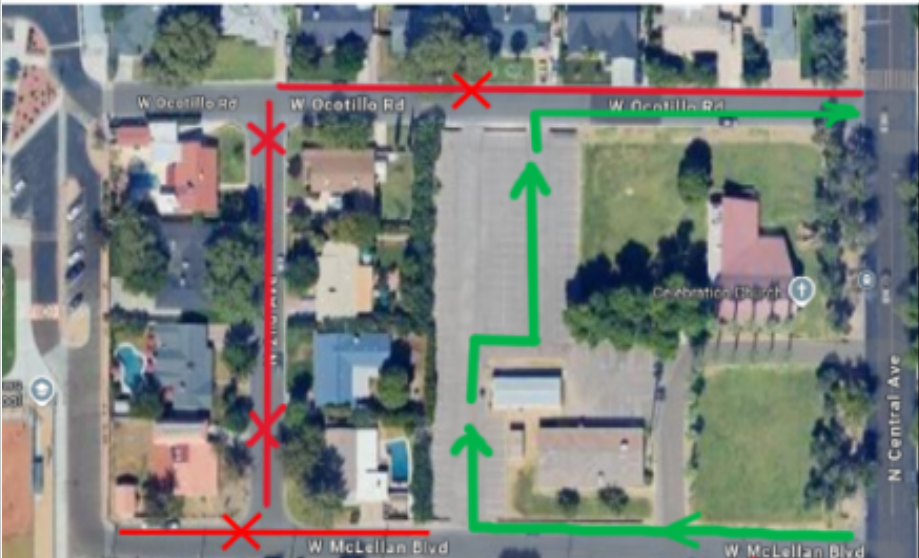
Church Parking Lot on the west side of Central Ave, between Ocotillo Rd and McLellan Blvd. School drop-off and pick-up in the church parking lot should be accessed by entering from McLellan Blvd and exiting onto Ocotillo Rd. To help Meadows remain a good neighbor to the surrounding community, please avoid driving or parking west of the church lot. Additionally, do not park on the north side of Ocotillo Rd. Please refer to the map below for a visual of these guidelines.
*Note that student drop-off and pick-up are not permitted in the school parking lot located on the west side of the campus.
Check out the district’s Family Resources page for more helpful information we may not have included.
What is PowerSchool and how do I access it?
PowerSchool is the main platform used by the Madison Elementary School District to communicate and maintain student information.
Click here to log-in to PowerSchool. Your student also has a PowerSchool account and can log-in to it via their school-provided email.
What is PowerSchool used for?
PowerSchool is a very helpful tool in staying on top of things with your student and at school. Here’s what you can use it for:
Finding your student’s schedule
Emailing your student’s teachers
Checking your student’s grades
Reviewing your student’s class assignments
Paying school fees like the yearly Activity Fee, field trip fees, club fees, etc.
Completing annual registration forms
Updating your student’s emergency contact information
Updating your contact information
How do I pay for my student’s school meals?
Log-in to Linq to view your student’s meal balance, add money to their meal account, and even view what food they are purchasing.